
quad
quad is a language for drawing tidy flow diagrams where boxes line up cleanly, gaps come out even, and everything is forced onto an invisible grid.
The compiler and every example on this page are in the quad repository.
Diagrams rot. You add one box and spend ten minutes dragging the others around. You hand the file to a graph layout tool and everything jumps. Labels of different lengths give you boxes of different widths. Arrows come out almost straight. Gaps come out almost even.
quad puts everything on a grid. One box size, one gap, integer coordinates from the first statement to the last line of SVG. Every label is measured with the real font, so a longer one does not make a wider box.
diagram "Release" { flow down }

kind stage box spans [1, 2]

stage  build  "Build"
stage  test   "Run tests"
choice green  "All green?"
stage  sign   "Sign artifacts"
stage  notify "Notify author"
end    ship   "Publish release"

build -> test -> green
green -> sign : yes
green -> notify : no
sign -> ship
notify -> ship

sameline build test green sign ship
order green: sign notify
role error { notify, green -> notify }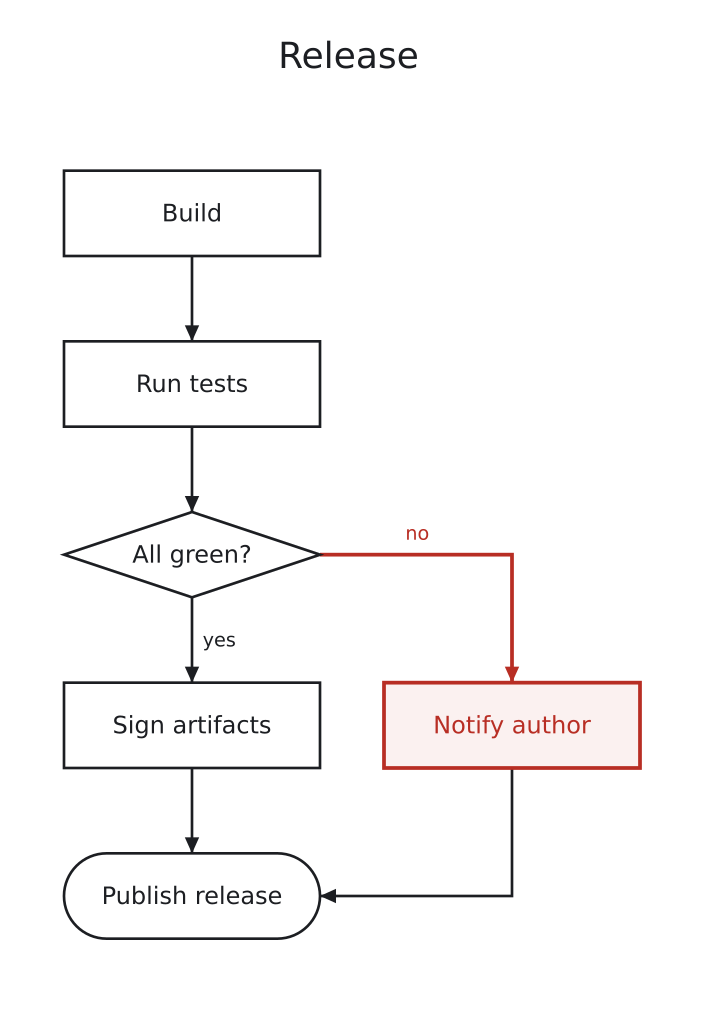
box, choice and end draw the shapes. -> draws an arrow, and a word after a colon labels it. sameline keeps the main path straight. role error marks the branch that goes wrong; the color for it lives in a theme file.
quad doesn't do very much
quad isn't a drawing program and it won't lay out an arbitrary graph. Hand it an ugly mess and you get an ugly mess. It draws flow diagrams: things that happen in an order, with branches, sometimes in lanes. If that's not what you have, use Graphviz.
There's no editor, no live preview and no web playground. You write a file and run a compiler.
No coordinates, anywhere
There are no coordinates anywhere in the language. samestep puts boxes in the same step. apart says how far apart two of them sit. between puts a box in the middle of others. Turn the whole thing sideways with flow right and they all still hold.
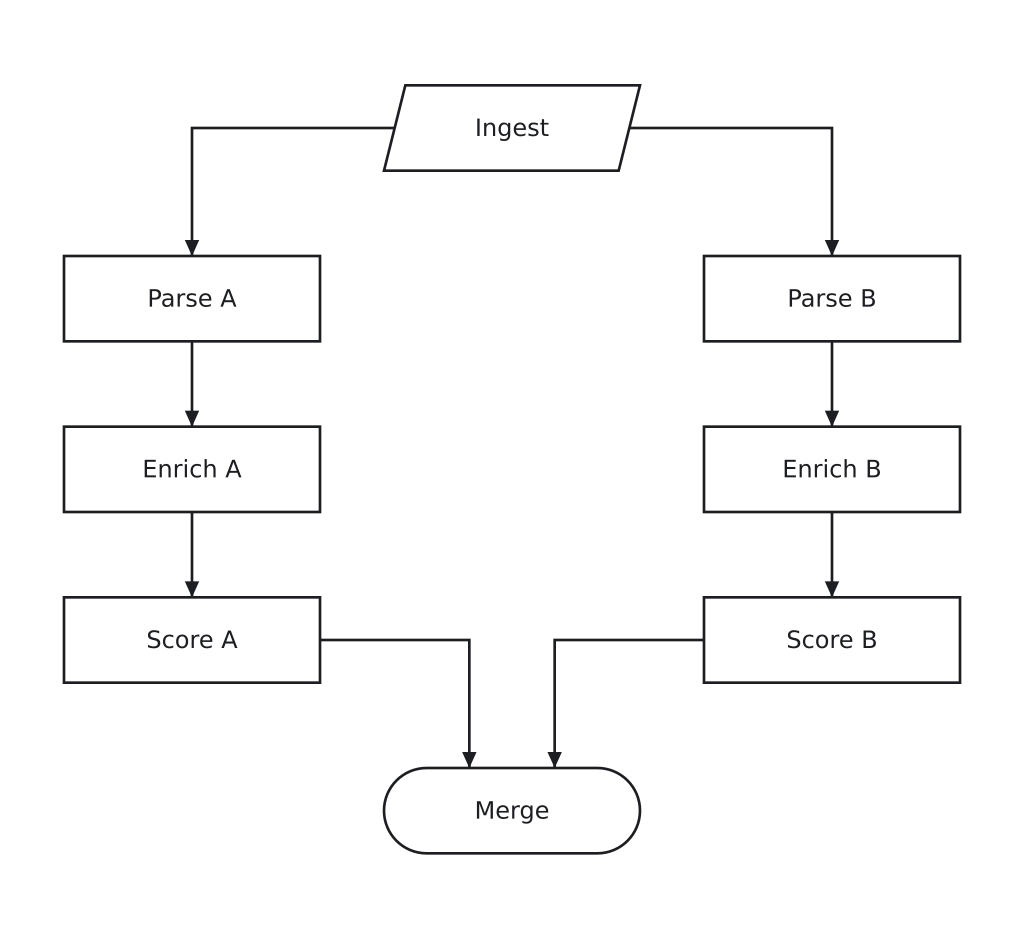 with
with sameline pb eb sb
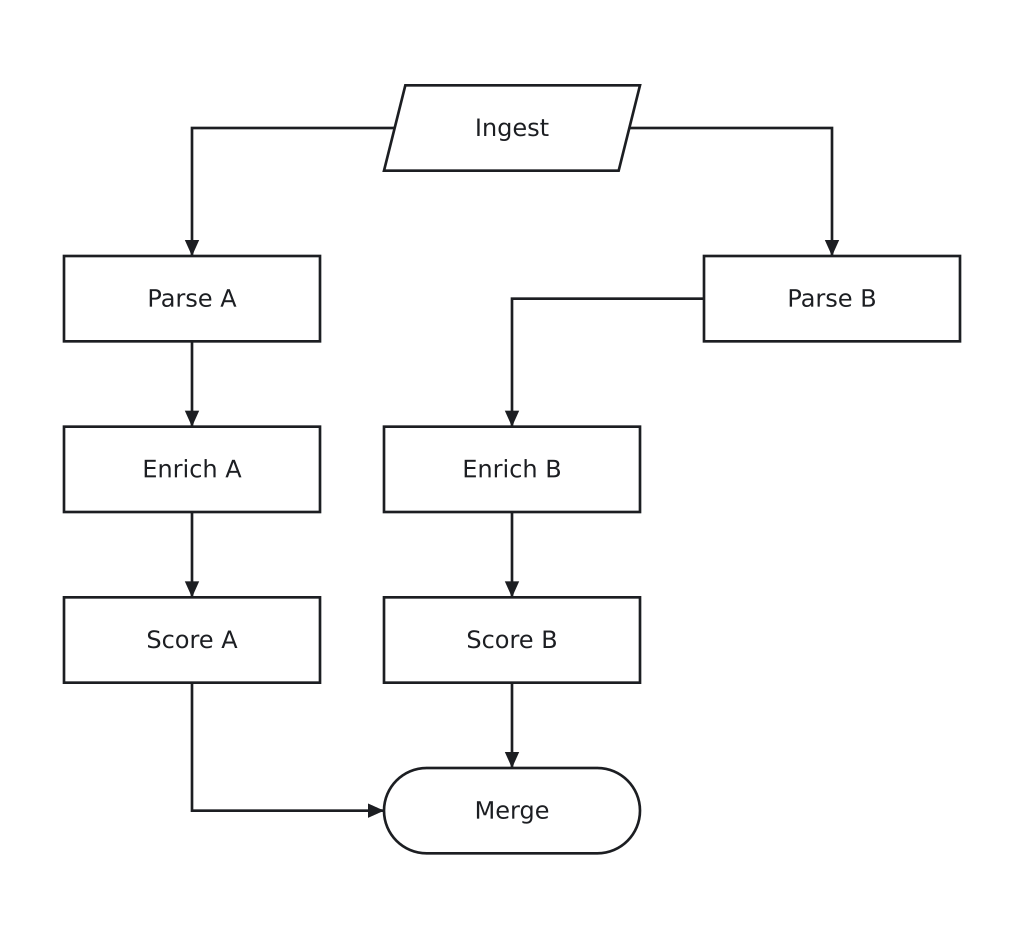 without it
io  ingest "Ingest"
box pa "Parse A"
box ea "Enrich A"
box sa "Score A"
box pb "Parse B"
box eb "Enrich B"
box sb "Score B"
end merge "Merge"
ingest -> pa -> ea -> sa -> merge
ingest -> pb -> eb -> sb -> merge
sameline pa ea sa
sameline pb eb sb
apart pa pb: 2 lines
between pa pb: ingest
between pa pb: merge
Lanes and groups
lane puts a band behind the boxes belonging to one person, team or service. group draws a region around a set of boxes and moves them as one. A group can run in its own direction, so a diagram going down the page can hold a row going across it.
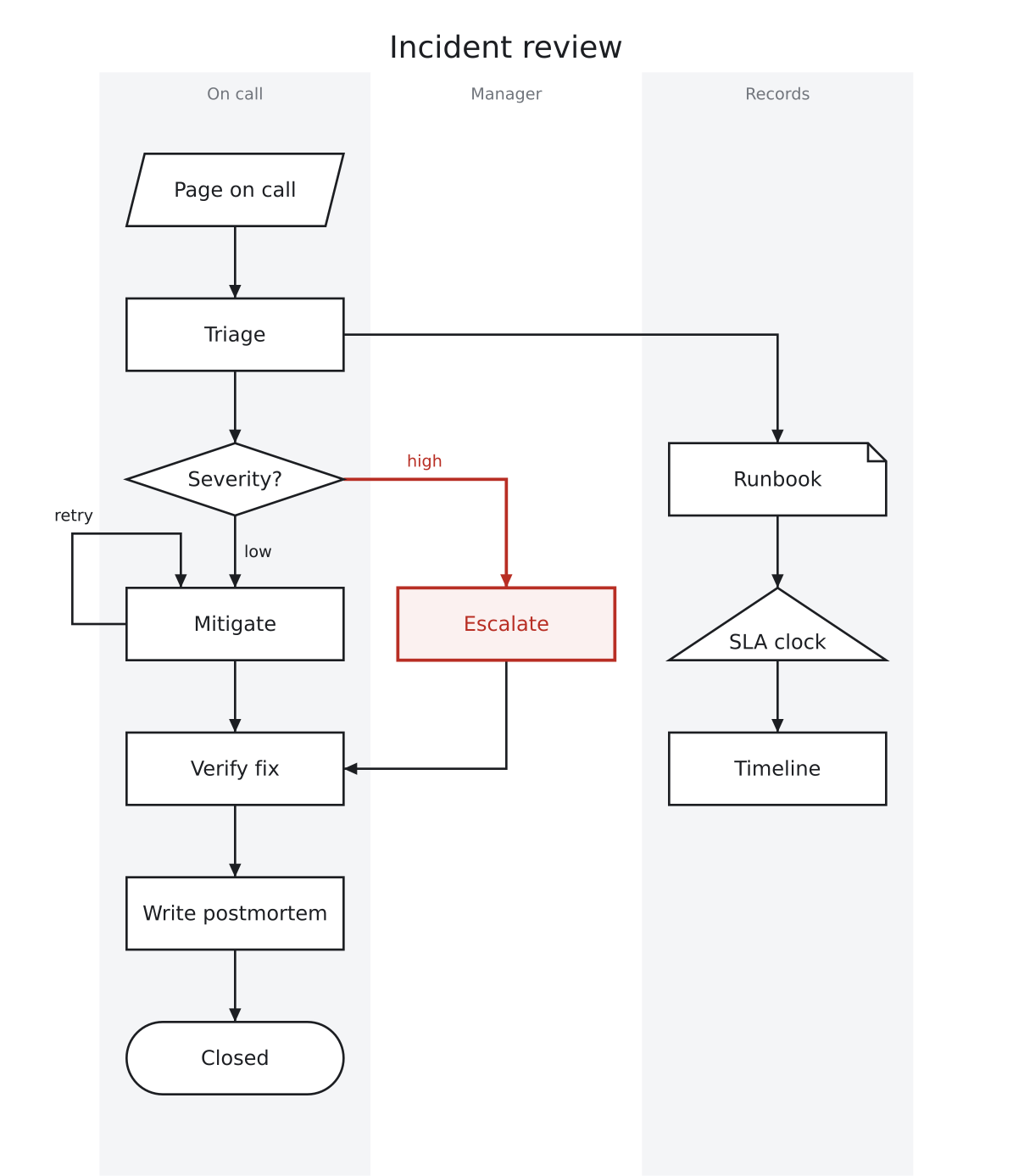
diagram "Incident review" { flow down }

io     page    "Page on call"
box    triage  "Triage"
choice sev     "Severity?"
box    mitigate "Mitigate"
box    escalate "Escalate"
box    verify  "Verify fix"
box    postmortem "Write postmortem"
end    closed  "Closed"

note   runbook "Runbook"
mark   clock   "SLA clock"
box    timeline "Timeline"

page -> triage -> sev
sev -> mitigate : low
sev -> escalate : high
mitigate -> verify
escalate -> verify
verify -> postmortem -> closed
triage -> runbook
runbook -> clock -> timeline
mitigate -> mitigate : retry

sameline page triage sev mitigate verify postmortem closed
samestep mitigate escalate
sameline runbook clock timeline
order sev: mitigate escalate

lane oncall  "On call"  { page triage sev mitigate verify postmortem closed }
lane manager "Manager"  { escalate }
lane records "Records"  { runbook clock timeline }

role error { escalate, sev -> escalate }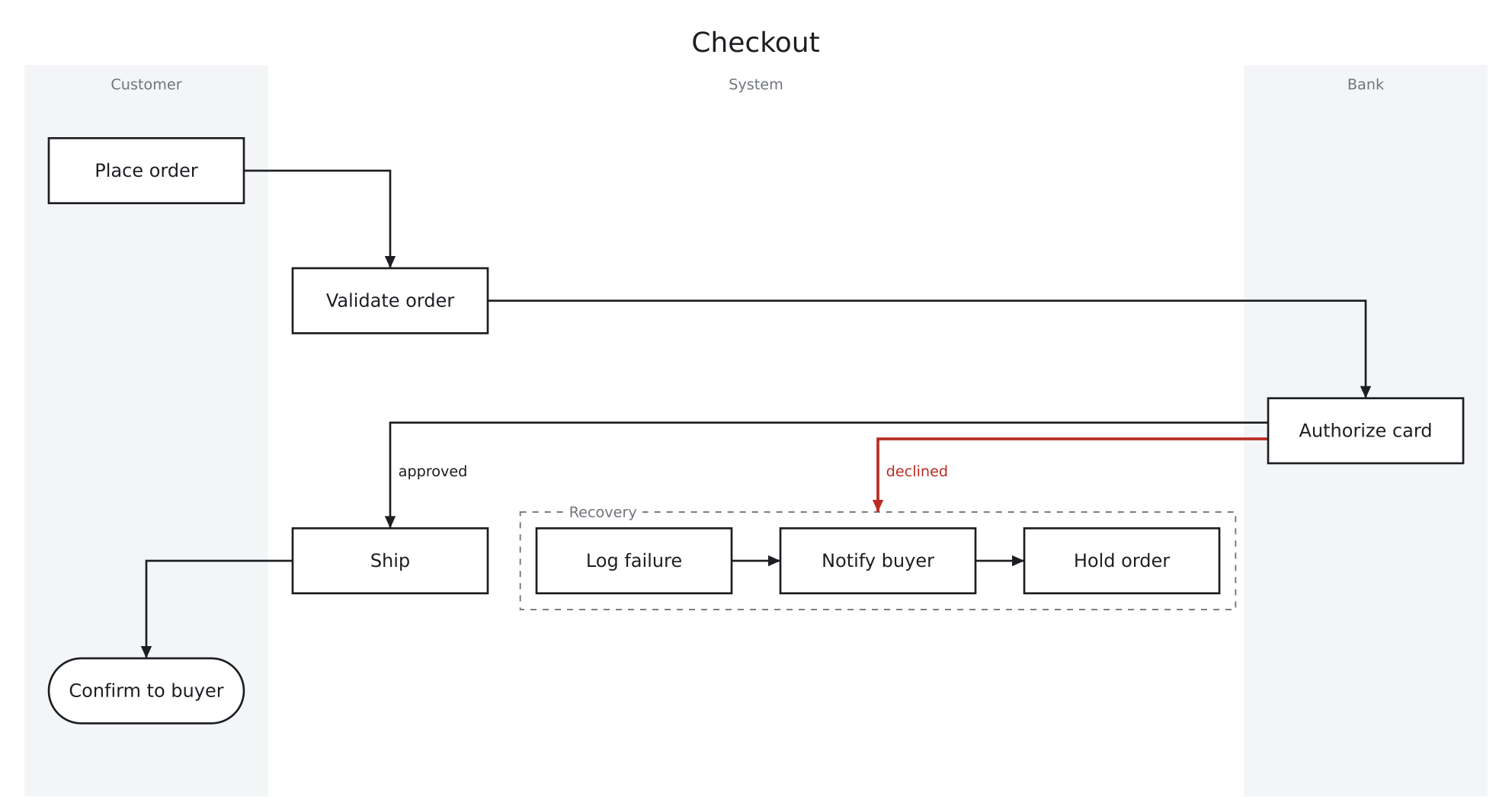
diagram "Checkout" {
  flow down
}

box place     "Place order"
box validate  "Validate order"
box authorize "Authorize card"
box ship      "Ship"
end confirm   "Confirm to buyer"

box log       "Log failure"
box notify    "Notify buyer"
box hold      "Hold order"

place -> validate -> authorize
authorize -> ship : approved
authorize -> recovery : declined
ship -> confirm
log -> notify -> hold

group recovery "Recovery" { flow right; log notify hold }

lane customer "Customer" { place confirm }
lane system   "System"   { validate ship recovery }
lane bank     "Bank"     { authorize }

role error { recovery, authorize -> recovery }
Themes
A theme is a file of colors, fonts and line widths. You pass it with --theme. Anything it leaves out keeps the built-in value, so a theme can be three lines.
A theme also says how sharply an arrow turns. corners is how much of each corner an arrow keeps, from 100 down to 0. 100 keeps the whole corner, so the arrow turns at a right angle. 50 keeps half of it, so the arrow curves with a straight run either side. 0 leaves no straight run.
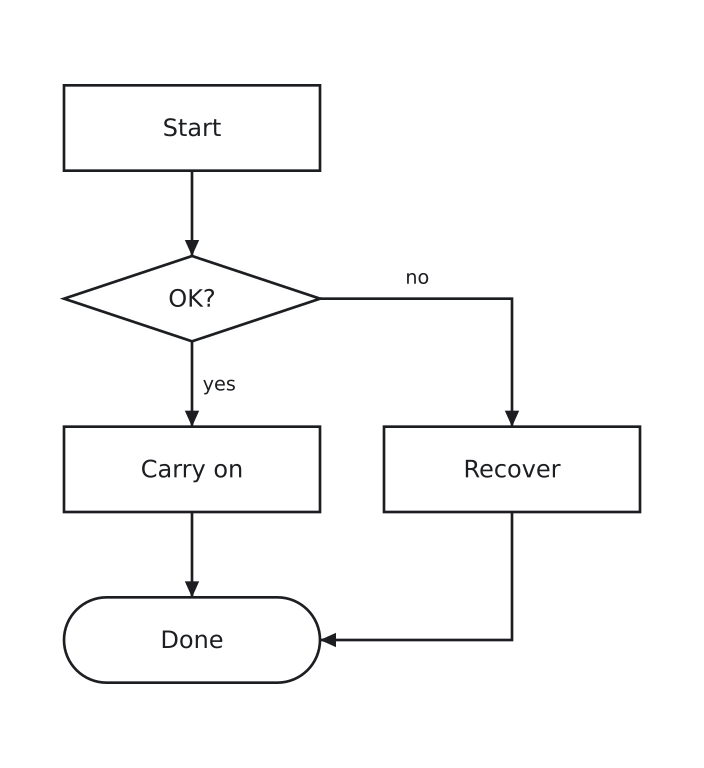
square.toml
# A theme keeping the whole of every corner, so an arrow turns at a
# right angle.

[style]
corners = 100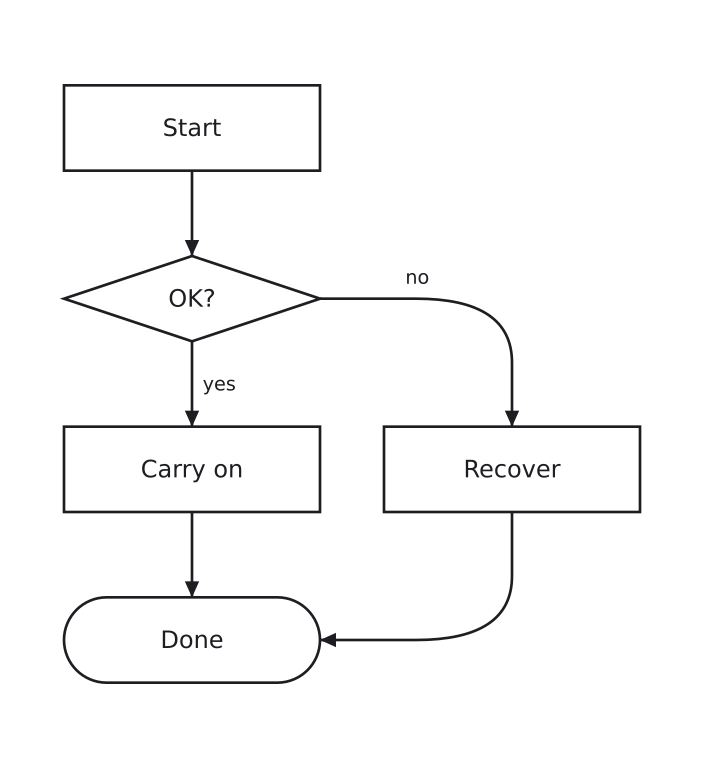
halfway.toml
# A theme keeping half of each corner, so a curve has a straight run
# either side of it.

[style]
corners = 50box start "Start"
choice ok "OK?"
box carry_on "Carry on"
box recover "Recover"
end done "Done"
start -> ok
ok -> carry_on : yes
ok -> recover : no
carry_on -> done
recover -> doneRelated work
All of these are older, better documented and more capable than quad, and quad took something from every one of them.
- Graphviz — The one everything else gets measured against. DOT is where writing a graph and letting the tool place it came from, and quad's layering is a constrained version of its layered layout.
- pikchr — A PIC-like language for diagrams in technical documentation, by the author of SQLite. Its case that a diagram belongs in the repository as text, and its habit of printing every example beside the picture it draws, are both taken up here.
- PIC — Brian Kernighan's 1982 language, and the ancestor of most of this. You say how things relate and it works out the coordinates. That's the whole idea quad is built on.
- D2 — A modern text-to-diagram language with a great deal of polish, and the clearest recent argument that this kind of tool deserves real typography.
- Mermaid — The one most people meet first, because it renders in Markdown wherever they already write. It set the expectation that a diagram is a fenced code block.
- PlantUML — Two decades of covering every diagram anyone asked for, and the reason a plain-text diagram in a code review is a thing nobody blinks at.
- nomnoml — A small, sharp syntax that showed how little notation a readable diagram needs.
- Structurizr DSL — Describes a system once and draws several views of it, which is the right answer to a problem quad does not attempt.
- kroki — One API in front of thirty of these languages, and the easiest way to try several before settling on one.
- TikZ and PGF — The standard for figures in typeset documents. It's why quad emits TikZ, so a diagram can land in a paper set in that paper's own font.
- Typst — A typesetting system with a language you can hold in your head, and it recompiles fast enough to watch. Different problem, same complaint about the incumbent.
- TikZiT — A graphical editor that writes TikZ, for when the diagram really is easier to draw than to describe.
Get it
On macOS and Linux, Homebrew installs it. The formula builds quadc from source and brings the Rust it needs to do that, so nothing has to be installed first.
brew install thomergil/quad/quadWhere a Rust toolchain is already installed, cargo builds the same binary. Every release also carries a built quadc for macOS and for Linux on x86-64, which is one self-contained file with the face it measures with inside it.
cargo install --git https://github.com/thomergil/quad quadcBuilding from a clone needs Rust 1.80 or later, which rustup installs with one command on Linux and an installer on Windows.
git clone https://github.com/thomergil/quad.git && cd quad
cargo build --release
./target/release/quadc build diagram.quad -o diagram.svg
quadc buildwrites SVG, PDF, TikZ, JSON or plain text.quadc fmtrewrites a file in its canonical form.quadc lintcounts what is worth reducing.quadc suggestoffers an order that crosses fewer arrows.quadc why <box>tells you which statement decided where a box sits.
Claude skill
This repository is a Claude Code plugin marketplace.
claude plugin marketplace add thomergil/quad
claude plugin install quad@quad
The skill is /quad:draw.
Read on
- quad manual — a tutorial in 136 examples
- quad language design